
Headshot and Resume for Lawyers: A Practical Guide
September 22, 2026 · 14 min read · Five Star Placements
Table of contents
You've polished your resume, removed the obvious errors, and found a promising legal opening. Then you pause at the application screen, wondering whether your LinkedIn photo should also appear on the resume. That decision matters, but not for the reason most career guides suggest. In U.S. legal hiring, your headshot and resume should work as a coordinated pair across the hiring funnel, not as two competing versions of your professional identity.
My recommendation is direct: keep the resume photo-free, and put your professional headshot where it helps, on LinkedIn, firm biographies, recruiter profiles, conference materials, and interview packets. Your resume should make your experience easy to evaluate. Your headshot should reinforce recognition and professional presence after the reviewer moves beyond the document.
Table of Contents
- Why Headshot and Resume Decisions Belong Together
- What the Data Says About Photos on Resumes
- Building a Resume That Works for Law Firms and In-House
- Producing a Professional Headshot for Legal Hiring
- Real Photos, Retouched Photos, and AI Headshots Compared
- How a Recruiter Actually Reviews Your Materials
- Pre-Submission Checklist for Headshot and Resume
Why Headshot and Resume Decisions Belong Together
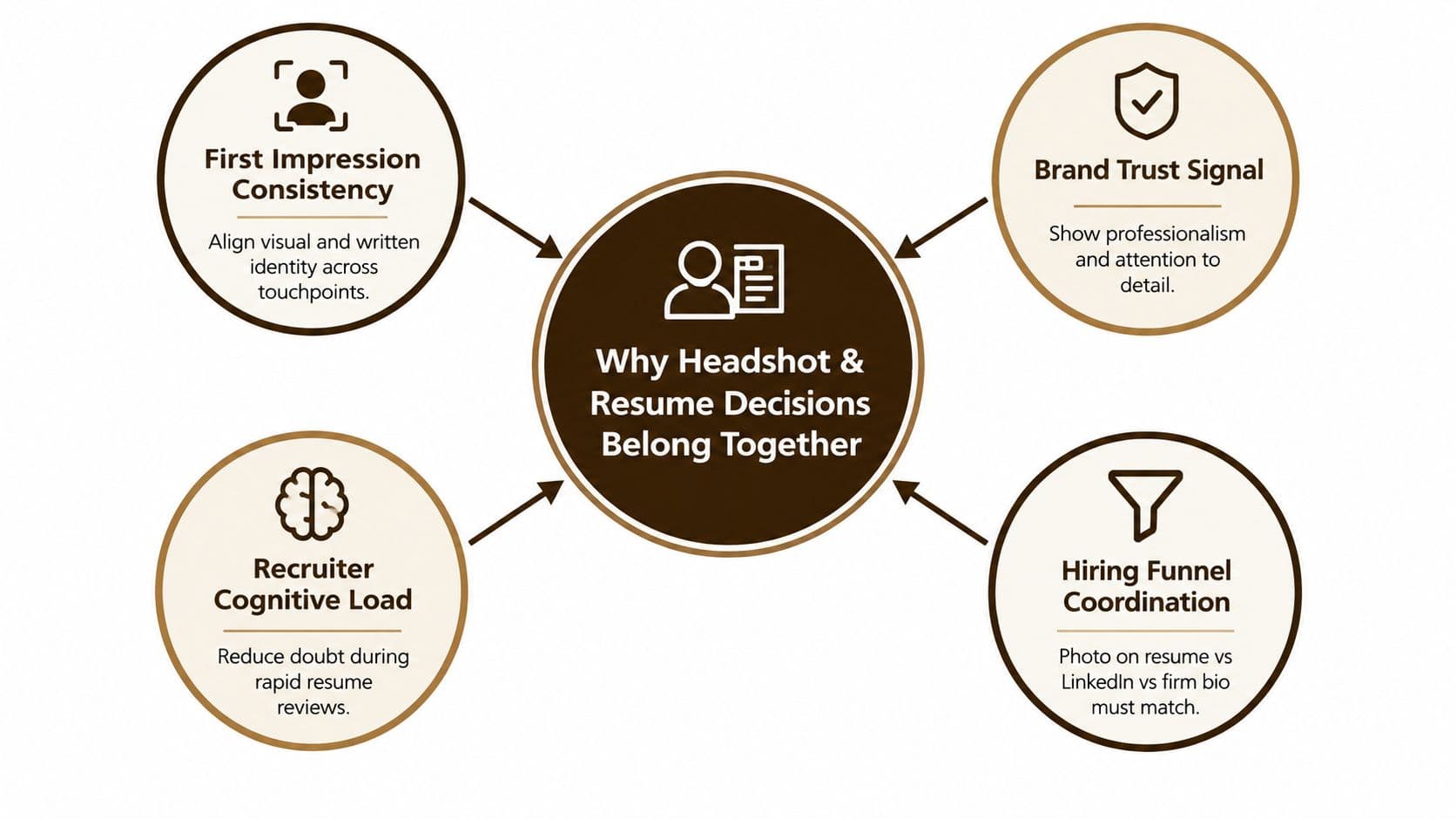
The better question isn't “Should I put a photo on my resume?” It's “Where should my headshot support my candidacy, and where can it create avoidable risk?” A law-firm recruiter may encounter your materials through several channels, including an application portal, LinkedIn, a recruiter introduction, a firm website, and a partner interview packet. Those touchpoints should feel consistent without becoming visually repetitive or legally problematic.
A photo on a U.S. legal resume usually creates more downside than value. It can expose information unrelated to your qualifications, introduce appearance-based judgment into an already compressed review, and interfere with the text-first structure that applicant tracking systems handle best. The resume should therefore carry the evidence of your candidacy, such as practice experience, client responsibility, bar admissions, deal or matter exposure, and writing strength.
Your headshot has a different job. On LinkedIn, it helps a recruiter recognize you after an introduction. In a firm biography, it supports credibility and continuity. In interview preparation, it gives partners a visual reference before they meet you. The image should be current, natural, and unmistakably you, while the resume remains clean, searchable, and focused on legal substance.
The coordinated impression
A polished candidate doesn't use identical formatting everywhere. A resume may be a restrained PDF, while LinkedIn may include a broader professional summary and a firm bio may use a tightly cropped portrait. What must remain consistent is the underlying identity.
Use the same name, current employer, practice focus, bar status, and career chronology across platforms. If your LinkedIn photo is dramatically outdated, heavily stylized, or inconsistent with the person who appears in an interview, it creates a question you didn't need to raise.
Practical rule: Let the resume prove that you can do the work. Let the headshot make it easier for people to remember and trust the professional they're evaluating.
What the Data Says About Photos on Resumes
The evidence doesn't support a universal claim that photos help or hurt every applicant. It shows something more important for lawyers: photos can change hiring outcomes, and the direction of the effect depends on the market, role, gender, and perceived attractiveness.
One field experiment reported that resumes with attractive photos received 36% more callbacks than resumes with unattractive photos, with callback rates of 10.3% versus 7.6%, and that candidates with attractive photos were contacted about 30% faster. A separate study in China found that applicants with unattractive faces had to submit 33% more applications to obtain the same number of interview callbacks as attractive applicants. These findings don't establish that a photo improves legal candidacy. They demonstrate that a photo can introduce appearance-based selection even when qualifications are otherwise comparable. See the labor-market evidence on resume photos and callback outcomes.
Other evidence points in the opposite direction for U.S.-style hiring. A reported analysis covering 14,622 applications across 12 industries found a 12.4% lower callback rate for technical roles and a 22.8% lower rate for administrative and finance roles when a photo was included. The same source cites LinkedIn Talent Solutions data reporting 23% fewer interview callbacks in the U.S. and 18% fewer in the UK for applicants with photos. Those results reinforce the practical U.S. recommendation: don't make the resume reviewer process your appearance when the document is supposed to establish your legal qualifications. The analysis of resume photos in U.S.-style hiring provides that comparison.
The Israel experiment makes the bias problem even clearer. Researchers submitted 5,312 CVs to 2,656 openings and found that attractive men had a 19.9% callback rate, compared with 9.2% for resumes without photos. Women experienced the opposite pattern, with no-photo resumes receiving the strongest callbacks and outperforming attractive-woman photo resumes by 22%. The lesson for legal candidates is blunt: a headshot can amplify bias rather than add useful information. The discussion of the Israel resume-photo experiment explains why omitting a photo is often safer where photos are nonstandard or legally sensitive.
Photo versus no photo on a legal resume
| Factor | Photo Included | Photo Removed |
|---|---|---|
| ATS processing | May be stripped, ignored, or create formatting complications | Keeps the file centered on searchable text |
| Bias exposure | Invites judgments based on appearance and protected traits | Limits visual information unrelated to legal qualifications |
| U.S. legal convention | Usually nonstandard | Expected and professionally safer |
| LinkedIn visibility | The image is already available elsewhere | Keeps the resume focused while preserving the headshot on LinkedIn |
| Reviewer attention | Can distract from experience or create an unintended first impression | Directs attention to practice, credentials, and results |
Legal hiring magnifies the stakes because reviewers often compare candidates in narrow, highly selective pools. A partner deciding whether to meet a lateral associate, a committee reviewing a senior hire, or an in-house leader evaluating counsel may have limited time and incomplete context. Don't give an irrelevant visual cue a larger role than it deserves.
Building a Resume That Works for Law Firms and In-House
A strong legal resume answers four questions quickly: What do you practice? Where have you practiced it? What responsibility have you handled? Are you eligible to do the work? Everything on the page should support those answers.
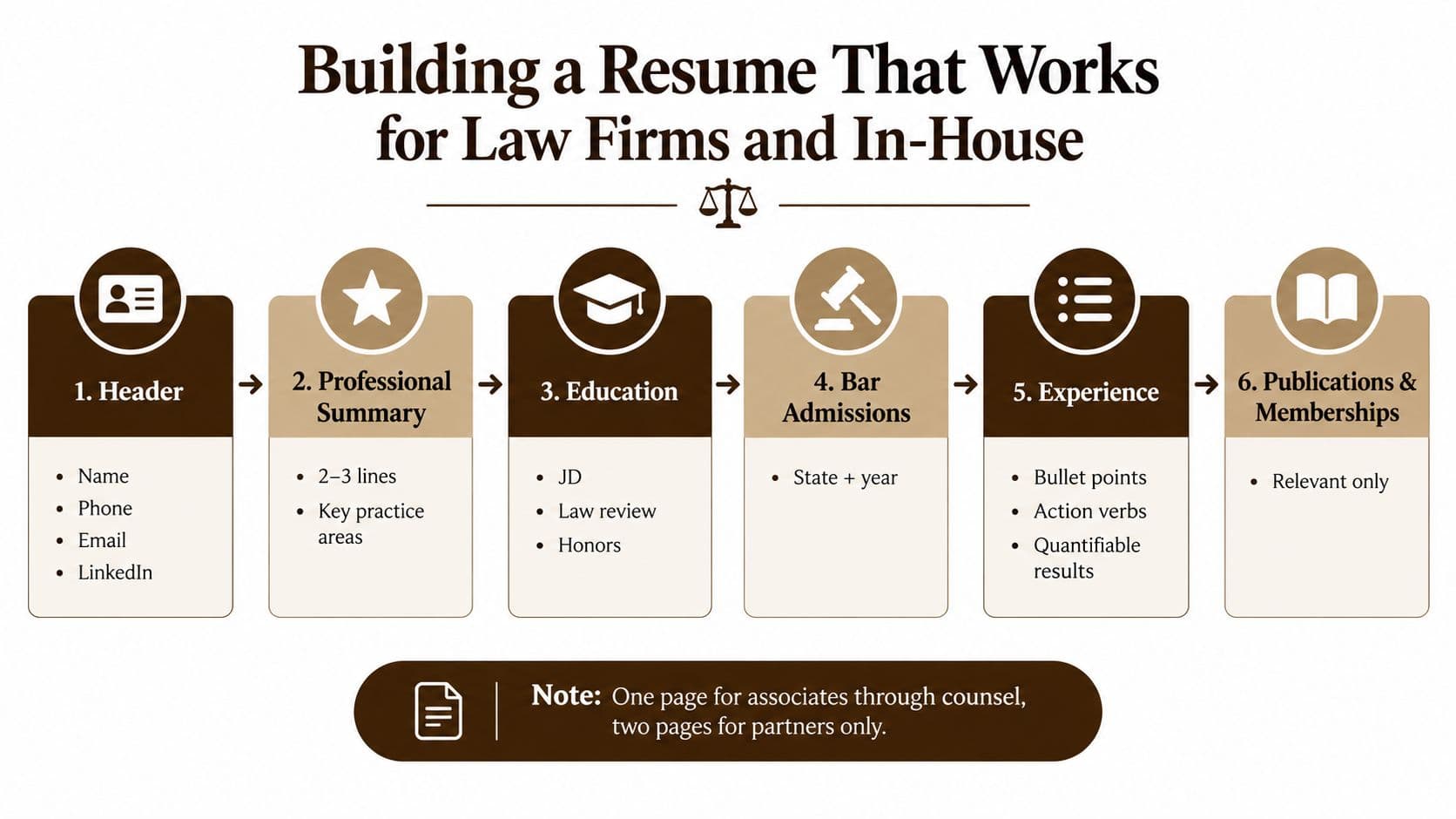
Start with a restrained header containing your name, phone number, professional email address, city and state if useful, and LinkedIn profile. Don't include a headshot, full home address, marital status, personal identifiers, or decorative graphics. A text-based layout gives both human reviewers and ATS tools a clearer document to process.
Use a structure that supports legal review
For associates through counsel, use one page when the content can remain substantive and readable. Partners and senior in-house leaders may need two pages when board work, publications, speaking credentials, major matters, or leadership responsibilities add decision-making value. Length alone doesn't signal seniority. Relevant detail does.
A practical order is:
- Header and professional summary: Use two or three lines to identify your level, practice areas, industry exposure, and the role you're targeting.
- Experience: List employers in reverse chronological order. Name the firm or company, title, location when relevant, and dates. Use bullets that show action, judgment, and scope.
- Bar admissions: State each jurisdiction and admission year accurately.
- Education: Include the JD, school, honors, law review, clerkships, and other distinctions that remain relevant.
- Select matters: Add representative matters only when confidentiality permits and when they clarify the work you performed.
- Publications, speaking, pro bono, and memberships: Keep these selective and connected to your practice.
Your bullets should show what changed because of your work. Instead of “Responsible for commercial litigation,” write that you drafted dispositive motions, managed discovery strategy, prepared witnesses, negotiated resolution terms, or advised a business team through a dispute. Use numbers only when you can verify them and disclose them appropriately. If a matter is confidential, describe its legal and business context without naming the client or revealing protected details.
Match the employer's vocabulary
Read the actual posting and mirror accurate practice-area language. A litigation role may prioritize motion practice, discovery, deposition preparation, trial support, investigations, or appellate briefing. An in-house role may emphasize commercial contracts, product counseling, privacy, compliance, employment advice, procurement, or cross-functional business partnership.
Don't load the resume with generic phrases such as “results-oriented attorney” unless the surrounding bullets prove what that means. A hiring partner wants to see practice-ready evidence, not a list of personality traits.
For additional guidance on removing clutter and strengthening structure, use this legal resume dos and don'ts guide.
Producing a Professional Headshot for Legal Hiring
A legal headshot should look like the person a client, partner, judge, or business leader will meet. It shouldn't look like a graduation portrait, social-media selfie, or advertising campaign. Your objective is credible professional recognition, not glamour.
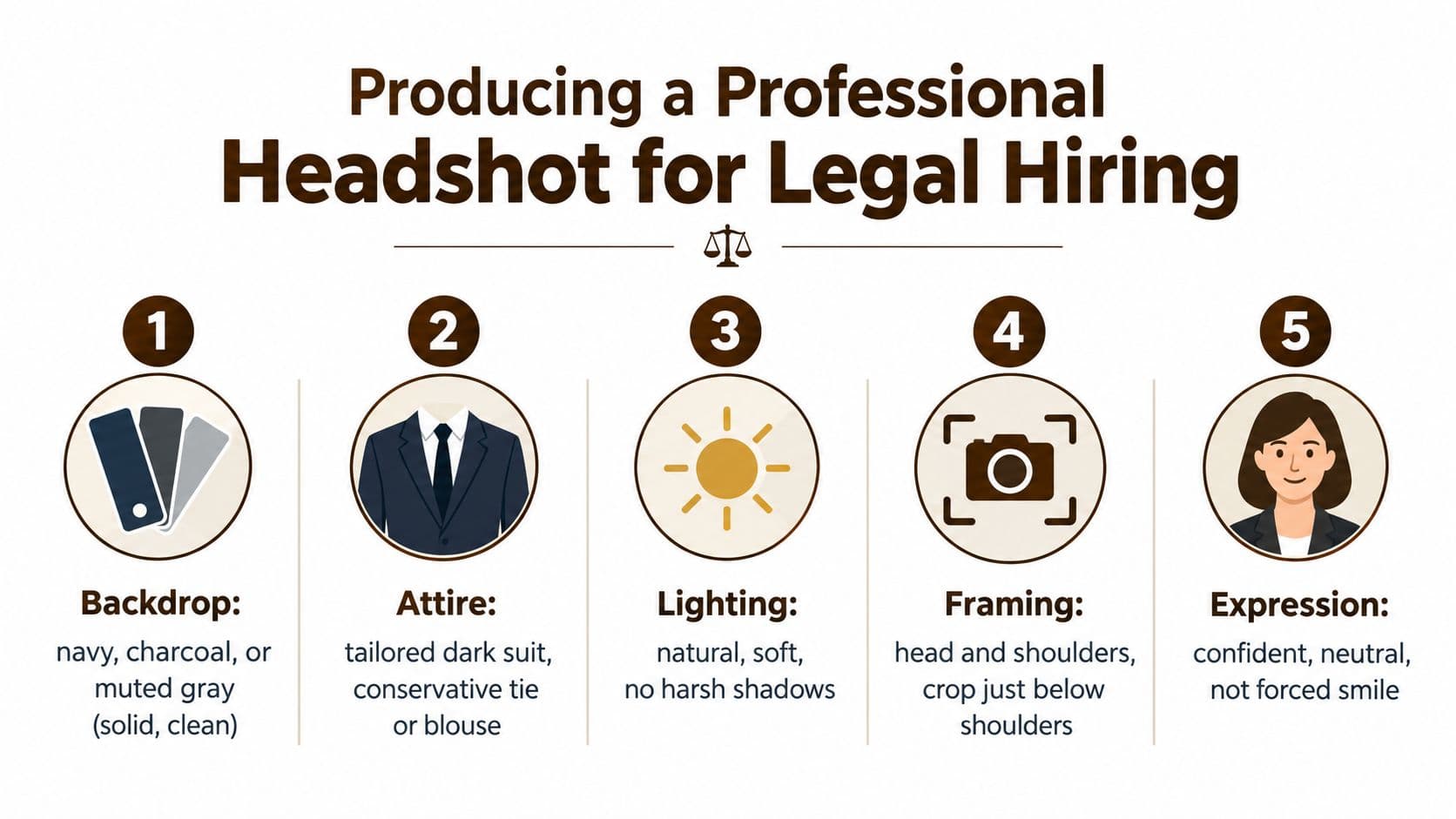
Choose a solid backdrop in navy, charcoal, or muted gray. Wear a dark suit that fits well, a conservative tie, or a simple professional blouse and understated jewelry. Avoid patterns that dominate the frame. Prepare clothing the night before, check collars and cuffs, and arrive with grooming handled rather than relying on digital correction.
Schedule the session in soft natural light or a controlled studio setting. Mid-morning can work well for natural light, but consistency matters more than a particular clock time. Ask for a head-and-shoulders composition with a crop just below the shoulders, enough space for LinkedIn variations, and a tighter version suitable for a firm biography or conference badge.
Give the photographer a precise brief
Tell the photographer that the image will appear in legal recruiting contexts. Request relaxed shoulders, a slight angle toward the camera, and a neutral or closed-mouth smile that reads as confident rather than performative. You want attentive eyes and a calm expression, not an exaggerated pose.
Limit retouching to blemish cleanup and sensible color correction. Don't approve facial reshaping, aggressive skin smoothing, artificial teeth whitening, or a background replacement that looks digitally manufactured. If the image makes you look materially different, it has failed its basic professional purpose.
A partner doesn't need a perfect portrait. A partner needs to recognize the person in the photograph when that person enters the room.
Legal-industry do's and don'ts
- Do choose clarity: Keep the face well lit and the background quiet.
- Do keep the image current: Replace it after a meaningful change in hairstyle, facial hair, or overall appearance.
- Don't use group crops: A cropped networking or wedding photograph looks improvised and makes identification harder.
- Don't use sunglasses: They conceal the visual connection the headshot is meant to establish.
- Don't use a candid bar photo: Informality can suggest poor judgment in a partner-screening context.
- Don't place the photo on the resume: Put it on LinkedIn, firm biographies, and other appropriate professional profiles instead.
Use the following video as a visual reference for preparing a professional headshot:
Real Photos, Retouched Photos, and AI Headshots Compared
Recruiters aren't evaluating only image quality. They're evaluating whether the image supports a credible professional identity. The safest headshot is the one that looks polished without concealing what you look like.
An unedited professional photograph can be perfectly acceptable if lighting, framing, and color are already strong. A lightly retouched image is usually the best choice for most lawyers. Removing a temporary blemish or correcting exposure improves presentation without changing identity.
Heavily retouched portraits create a different problem. Excessive smoothing, facial reshaping, or artificial whitening can make the image look less trustworthy, especially when a partner sees you in person soon afterward. AI-generated or AI-augmented images carry an additional credibility risk. Recent reporting says 66% of recruiters would be put off when they know a headshot is AI-generated, according to reporting on AI-generated headshots and hiring bias.
The broader resume dataset found that 79.2% of resumes had no photo, while 10.2% included a real professional headshot, 8.8% included a real casual or selfie-style photo, and 1.8% included an AI-generated headshot. Among resumes that did include a photo, 49.2% were real professional headshots, 42.2% were casual or selfie-style images, and 8.6% were AI-generated. The resume report on photo use and AI headshots shows that headshots remain a minority feature, even as the types of images become more varied.
Headshot type comparison for legal hiring
| Photo Type | Recruiter Trust | Authenticity Risk | Callback Risk | Recommended For |
|---|---|---|---|---|
| Real professional photo | Strong when current and natural | Low | Lower than improvised alternatives | All legal professionals |
| Lightly retouched photo | Strong if edits are limited | Low to moderate | Generally appropriate | Associates, counsel, partners |
| Heavily retouched portrait | Uncertain | High if appearance changes materially | Can create concern during later review | Generally avoid |
| AI-generated or AI-augmented headshot | Weak when identified | Very high | Can undermine credibility | Not recommended for U.S. legal hiring |
My ranking is straightforward. Associates should use a real, lightly edited professional image on LinkedIn. Senior counsel and partners should use the same standard, with special attention to consistency across firm biographies, speaking profiles, and board-facing materials. AI headshots are a poor trade for legal professionals, because a small production shortcut can become a trust issue in a field built on credibility.
How a Recruiter Actually Reviews Your Materials
Consider a mid-level associate applying to a litigation practice. The recruiter opens the resume and looks first for school, current and prior firms, litigation experience, bar admissions, and signs that the candidate has handled the responsibilities described in the posting. A photo on the page would not answer any of those questions, so it only competes for attention.
The recruiter then opens LinkedIn. The headshot enters the review. The recruiter checks the current title, employment dates, practice description, career transitions, and whether the photograph presents a credible, current professional identity. The image doesn't replace the resume. It helps the recruiter connect the name on the application to the person being considered.
Next come the cover letter, writing sample, references, or other requested materials. If the resume says one thing and LinkedIn says another, the recruiter pauses. A title discrepancy, unexplained employment gap, stale photograph, or materially different appearance may not cause an automatic rejection, but it can prompt a closer review when the slate is competitive.
The visual check is contextual
Partners may see a candidate's LinkedIn profile while preparing for an interview. They may also receive a candidate packet containing a firm biography or professional photograph. At that stage, the headshot should support recognition and confidence, not invite questions about editing or authenticity.
The legal recruiter role explained by Five Star Placements reflects the broader point: screening extends beyond reading credentials. Recruiters assess fit, communication, experience, and presentation against the needs of a particular legal environment.
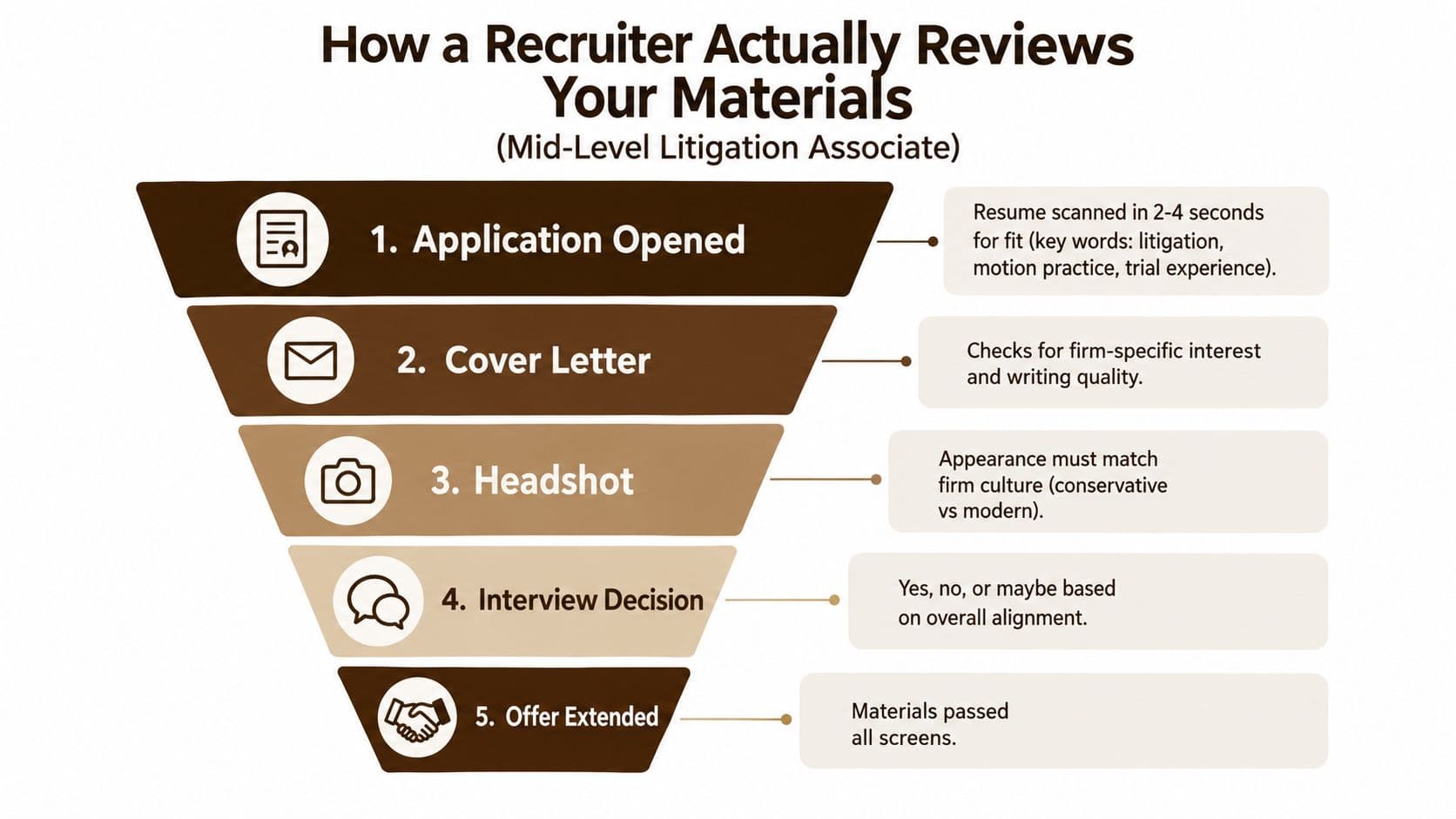
The resume earns the screen. LinkedIn helps confirm the professional identity. The interview determines whether the story holds up in conversation. Treat those as separate, disconnected assets and you'll create unnecessary friction.
Pre-Submission Checklist for Headshot and Resume
Run this checklist before every important application. It takes less time than correcting a contradiction after a recruiter or partner notices it.
Document quality
- Remove embedded images: Confirm the resume contains no headshot, logo, text box, or decorative graphic that could interfere with keyword extraction.
- Check the file format: Use a clean PDF unless the employer requests another format. Open the final file, select text, and confirm that the content behaves like text rather than a flattened image.
- Verify dates: Check every employment date, title, firm name, and location against your authoritative records.
- Match LinkedIn: Make sure your LinkedIn profile reflects the same chronology and current role. Explain legitimate differences through accurate descriptions rather than leaving contradictions unexplained.
- Audit practice keywords: Compare your resume language with the target posting. Remove keywords that don't describe work you've performed.
Headshot alignment
- Use the right location: Keep the image on LinkedIn, firm biographies, professional directories, conference profiles, and requested interview materials, not on the U.S. legal resume.
- Check the crop: Make sure the face remains clear in both a square LinkedIn thumbnail and a tighter biography crop.
- Review the setting: Use a clean, restrained background and professional attire appropriate for the firm or legal department.
- Confirm authenticity: Reject edits that reshape your face or make you look unlike the person who will attend the interview.
- Compare current versions: The photograph used in LinkedIn, a firm bio, or an interview packet should represent the same current appearance. Refresh it when your appearance changes meaningfully, or when the existing image no longer feels like you.
The final 60-second scan
Read only the top third of the resume first. Can a recruiter identify your practice, level, current employer, bar status, and target role without hunting? Then open LinkedIn and ask whether the photo, title, dates, and summary reinforce that same message.
Finally, send the materials to yourself and view them on a phone and a laptop. Look for awkward cropping, broken links, missing pages, inconsistent spacing, or a filename that still says “final version.” For interview preparation, use interview coaching for lawyers to pressure-test both your professional narrative and the questions partners may ask.
Five Star Placements helps attorneys, partners, in-house counsel, and legal professionals present a coherent candidacy from resume review through interview preparation. If you want a confidential assessment of your materials and access to legal placement opportunities, visit Five Star Placements and start a conversation with its recruiting team.
Need help filling a legal role?
Five Star Placements partners with law firms and legal departments nationwide.
Schedule a Call