
Matter Management Systems Explained for Legal Teams
September 10, 2026 · 16 min read · Five Star Placements
Table of contents
A partner asks for the status of a litigation portfolio. The general counsel wants an outside-counsel spend update before a board meeting. A business leader needs an answer on a request that arrived in a crowded inbox. The information exists, but it's spread across email threads, spreadsheets, shared drives, billing reports, and individual memory.
That arrangement creates more than administrative inconvenience. Lawyers spend time reconstructing facts instead of advising the business, deadlines become harder to see, budgets drift without early warning, and support teams carry the burden of keeping records current. A legal department can be working hard while leadership still lacks a dependable view of what's open, who owns it, what it may cost, and what needs attention next.

Matter management systems address that visibility problem by organizing legal work from request through closure. The strongest systems do more than preserve a record. They create a controlled workflow for intake, ownership, status, collaboration, spend, reporting, and governance.
This distinction matters because adoption alone doesn't prove operational value. A platform may hold matter names and documents while lawyers continue to manage requests manually, reporting remains dependent on spreadsheets, and connected tools fail to return information to the central record. The practical question is whether the system governs the work as it happens.
Table of Contents
- Introduction Why Matter Chaos Slows Legal Teams
- What Matter Management Systems Are and How They Work
- Core Features and Benefits That Drive Value
- How Law Firms and Corporate Legal Departments Use Matter Management
- How to Choose the Right Matter Management System
- Implementation Integration Security and Change Management
- Measuring ROI and Taking the Next Step
Introduction Why Matter Chaos Slows Legal Teams
A partner asks for the status of a matter before a client call. The answer may require an email search, a spreadsheet check, a billing report, and a message to the lawyer who attended the latest discussion. The work exists, but no single operating record shows what is open, who owns it, what it may cost, or what needs attention.
That fragmentation turns routine management into manual reconstruction. Requests wait for business input without a clear queue. Files exceed their expected scope before anyone notices. A lawyer's capacity is difficult to assess, and outside counsel may be waiting for a response that is visible only in one inbox.
Early matter management tools grew from corporate legal department needs in the late 1970s. One widely cited milestone traces the field to 1978, when Equitable Life adapted its WANG VS word-processing system to track legal matters, outside counsel, and daily legal operations. The internal tool later became Corporate LawPack, and the concept spread through the 1980s and 1990s across corporate legal departments, government agencies, financial institutions, and large companies, as described in the history of matter management software.
Practical rule: If a record is reconstructed after the work happens, the department is measuring memory and administrative discipline, not the workflow itself.
Modern platforms are more widely used, but workflow coverage remains uneven. The Association of Corporate Counsel's 2024 benchmark summary reported that 36% of legal departments used matter management systems, with adoption reaching 83% among companies with more than $20 billion in revenue, according to the benchmark summary and market outlook. The figures show a category that has moved beyond a niche database, while also revealing how many legal teams still have room to mature.
The useful question is not whether a platform stores matter names. It is whether the platform governs the work as it happens, including intake, ownership, approvals, updates, connected systems, and escalation. A matter management system should reduce the manual gaps between those steps, rather than give the department another place to maintain.
What Matter Management Systems Are and How They Work
Think of a matter management system as a central command center for legal work. It isn't a digital filing cabinet, and it isn't automatically a complete practice management platform. It should give the team one dependable place to initiate work, assign responsibility, monitor progress, preserve relevant information, and understand the department's portfolio.
The mechanics are easier to understand as a sequence.
Start with controlled intake
A request enters through a defined channel, such as an intake form, email capture process, or business portal. The requester supplies the facts the legal team needs to classify the work, identify urgency, recognize involved parties, and determine the appropriate owner. Capturing information at this point matters because the record begins with the source, rather than with a later reconstruction from scattered messages.
Turn requests into accountable work
The system routes the request to a lawyer, practice group, or legal operations queue. Assignment rules can reflect work type, business unit, urgency, workload, or approval requirements. The assigned team then works from a matter record that holds relevant tasks, deadlines, communications, documents, status updates, and financial information.
Govern the lifecycle
A governed workflow makes important transitions visible. The matter moves from opening to active work, review, escalation, and closure, with required fields or approvals at appropriate points. That structure helps leaders see stalled matters and helps departing employees leave behind an auditable record instead of informal knowledge.
Report across the portfolio
The individual matter is the micro view. Leadership needs the macro view too, including workload, open and closed matters, exposure, outcomes, and spend. Industry guidance on matter management metrics emphasizes the value of capturing intake, status, volume, closure, litigation exposure, and outcome information at the point of work so teams can identify backlogs and strengthen reporting discipline.
A useful system sits between the people doing the work and the wider legal technology stack. It may connect with document management, e-billing, contract lifecycle management, collaboration, finance, and AI tools. The system's value depends less on how many connections appear on a feature page and more on whether information moves reliably in both directions.
The distinction between passive tracking and active governance is central. A passive record tells you that a matter exists. An active platform helps determine how it enters the department, who owns it, what controls apply, when it requires attention, and how the department learns from its outcome.
Core Features and Benefits That Drive Value
A capable platform earns its place by improving daily legal work, not by displaying a long list of modules. The important test is whether each feature captures useful information once, moves the matter forward, and makes the resulting data available to the people who need it.
Intake and triage
A standardized intake process replaces informal forwarding with structured capture. The requester can provide the business unit, work type, parties, urgency, desired outcome, and supporting information in a consistent format. Triage then sends the request to the appropriate queue or lawyer.
That reduces avoidable back-and-forth, but only if the form asks for information the legal team uses. An overly complicated form discourages adoption, while a vague form moves the clarification work into email.
Lifecycle control
Lifecycle tracking shows where a matter stands and what should happen next. A litigation workflow may include key dates, responsible lawyers, outside counsel updates, reserve information, and approval points. A transaction workflow may emphasize documents, stakeholders, signing status, and post-closing obligations.
The system should preserve meaningful transitions, not force lawyers to update irrelevant fields. Good governance creates a dependable minimum record without turning every matter into a bureaucratic exercise.
Collaboration and documents
Centralized communication gives internal lawyers, support professionals, business stakeholders, and outside counsel a shared reference point. Document links, status notes, requests for information, and decisions should remain connected to the matter rather than disappearing into personal inboxes.
This is particularly important when multiple people contribute over time. A new team member should be able to understand the current position without interviewing everyone who previously touched the file.
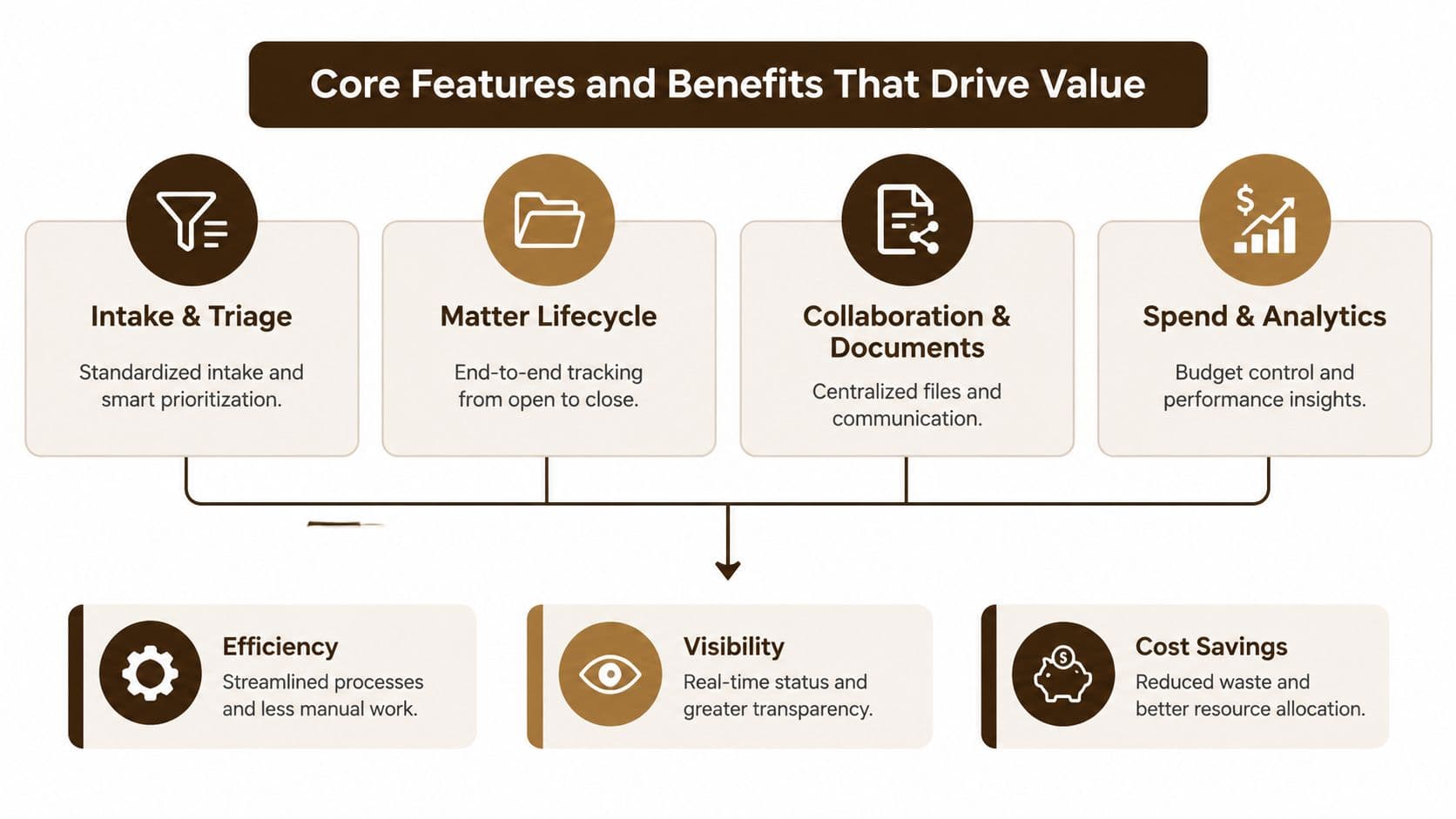
Spend and analytics
Spend controls connect legal activity to financial oversight. The team can compare approved budgets with current information, monitor outside-counsel performance, and investigate matters that require attention. Reporting becomes more credible when lawyers and support staff capture the underlying data during the work instead of rebuilding it at month-end.
For a practical view of the people and workflow support that litigation teams may need around this technology, see litigation support staffing.
The business benefits follow from these connections:
- Efficiency: Lawyers spend less time locating basic matter information and repeating status requests.
- Visibility: Partners, GCs, and legal operations leaders can see ownership, progress, workload, and risk across the portfolio.
- Cost control: Finance and legal teams can identify budget drift and external counsel spend that needs explanation.
- Capacity planning: Leaders can compare incoming demand with available legal resources before the department reaches a crisis point.
- Governance: Required steps, permissions, approvals, and closure practices become more consistent.
The strongest value comes from the combination. Intake without reporting creates orderly records but limited insight. Reporting without disciplined intake produces polished dashboards built on unreliable data.
How Law Firms and Corporate Legal Departments Use Matter Management
The same platform serves different operating models. A law firm generally asks whether the system helps deliver profitable, well-staffed client work. A corporate legal department asks whether it can control demand, support business decisions, manage external providers, and demonstrate service quality.
Law firm priorities
For a law firm, matter management connects client service with the economics of the engagement. A partner may need to understand whether work is progressing within scope, whether the right associate or paralegal is assigned, and whether the matter's activity supports the agreed billing approach.
A litigation team can use the matter record to coordinate deadlines, evidence tasks, filings, communications, and client updates. A transactional team may use it to manage diligence requests, document versions, approvals, signing requirements, and post-closing actions. The system also helps when a lateral partner or new team member joins, because the operational history is less dependent on informal handover.
Client reporting is another major distinction. A firm needs to present a clear account of progress, staffing, spend, and next steps without asking every timekeeper to create a separate narrative. Matter data can support those conversations when the firm defines consistent status fields and update expectations.
Corporate legal department priorities
An in-house team usually manages a broader portfolio of work types. Employment questions, compliance investigations, commercial disputes, transactions, intellectual property requests, and business advisory work may enter through the same department but require different workflows.
The department's first concern is often demand governance. A business unit should know where to submit work, what information to provide, and when to expect a response. The legal team needs a way to prioritize requests, distribute workload, and identify matters that are aging or blocked.
Outside counsel oversight adds another layer. The department needs visibility into instructions, budgets, status updates, risk, and outcomes across firms. That information can support provider reviews and help the GC explain legal demand to executive leadership.
| Operating model | Primary question | Useful matter view |
|---|---|---|
| Law firm | Is the engagement staffed, progressing, and economically sound? | Client status, workload, time, budget, realization, and profitability |
| Corporate legal department | Is legal demand controlled and aligned with business risk? | Intake, ownership, service levels, outside counsel, exposure, and outcomes |
The system should reflect the operating model rather than impose a generic workflow. A firm may prioritize time and profitability. An in-house department may prioritize response discipline, risk visibility, and resource allocation. Leaders responsible for building that operating model can also review the role of a legal operations director.

How to Choose the Right Matter Management System
A partner forwards a request by email. An approval sits in a separate thread. Outside counsel sends an update that never reaches the central record. By the time someone prepares a report, the team is checking several systems and rebuilding the matter history by hand. Choosing a platform means testing whether it can govern that chain of work, not admiring an impressive demonstration.
Start with workflow coverage. Ask each vendor to show how the same request moves from entry to a closed matter, including exceptions, approvals, non-contracting requests, outside counsel communication, reporting, and information returned from connected tools. The objective is to expose gaps between the workflow shown in a sales demo and the work lawyers perform every day.
The need for this discipline is clear. A 2025 legal intake and operations report found that 76% of legal departments still relied on manual processes to manage legal matters and 77% still handled all or part of reporting manually, according to the report on legal intake and operations. The same source reported that more than 45% of CLM users had no coverage for non-contracting requests. A system that handles contracts well can still leave the wider legal front door unmanaged.
Use a weighted scorecard, then test the results with a live scenario. Give every vendor the same request, approval condition, and reporting question. Count the manual steps, note where information must be entered again, and check whether the resulting data can support later reporting.
Matter Management System Vendor Evaluation Checklist
| Evaluation Criteria | Why It Matters | What to Ask Vendor |
|---|---|---|
| Workflow coverage | The platform should govern the full lifecycle, rather than merely store an open matter. | Can you demonstrate intake, assignment, escalation, closure, and non-contracting requests? |
| Integration and write-back | One-way exports create duplicate entry and stale records. | Which systems exchange data in both directions, and what returns to the matter record? |
| Security and compliance | Legal records require controlled access and a reliable audit history. | How are permissions, ethical walls, audit logs, retention, and data separation managed? |
| Usability and adoption | A difficult interface sends lawyers back to email and spreadsheets. | What does a lawyer do in the first minute after receiving a request? |
| Scalability | Processes change as the department, firm, or portfolio grows. | Can administrators modify fields, routing, templates, and reports without extensive vendor work? |
| Reporting | Leadership needs trustworthy information about the portfolio. | Can users report on aging, workload, spend, status, outcomes, and exceptions? |
| Support and training | Configuration alone does not change habits. | What implementation support, training, documentation, and ongoing service are included? |
| Total cost | License price excludes migration, integration, administration, and adoption work. | What internal roles and recurring services will the system require after launch? |
Budget pressure makes total cost particularly important. The 2025 operations index reported that 56% of legal departments remained under-resourced, while 55% reported flat or decreasing budgets and 51% reported flat or unchanged legal technology budgets, as summarized in the legal workflow integration research. A lower-priced platform that creates more administration can cost more to operate than a focused system with fewer, better-used capabilities.
Implementation Integration Security and Change Management
A matter arrives through email, approval stalls in a spreadsheet, and the final update never reaches the system of record. The platform did not create that confusion, but implementation can preserve it unless the team maps the work before configuring software.
Map the work before configuring the tool
Document how requests arrive, who reviews them, where conflicts and approvals occur, how documents are stored, how outside counsel reports progress, and how matters close. Mark every manual handoff, duplicate entry, and private spreadsheet. These gaps show whether the proposed system will govern work or merely record it after the fact.
Then define the minimum viable workflow. For each major matter type, specify required fields, escalation triggers, access rules, approval points, and the evidence needed for closure. Keep the first release narrow enough to test. Automating an unclear process only makes unclear work move faster.
Test integrations for depth
List the systems involved in daily work, including document management, e-billing, CLM, finance, collaboration, and AI tools. Evaluate each connection with four questions:
- What starts the exchange?
- Which fields move across systems?
- What happens when a user changes the information?
- Does the update write back to the matter record?
The final question separates a working integration from a superficial connection. Earlier workflow research found that AI tools wrote directly back to practice or matter management systems for only 23% of law firm respondents and 31% of in-house respondents. An assistant may produce a useful summary, but manual copying turns that output into another administrative task. Ask vendors to demonstrate the complete path, including errors, field conflicts, failed transfers, and audit visibility.
Build security into the design
Security belongs in the workflow design, not at the end of implementation. Review role-based permissions, sensitive matter access, audit trails, retention, records management, vendor controls, and data handling. Test realistic cases: a lawyer changes teams, an outside firm sees selected materials only, or an executive needs portfolio reporting without unrestricted document access.
Roll out with visible ownership
Start with a defined group and a manageable matter type. Recruit respected lawyers and support professionals as champions, train them on the actual workflow, and gather feedback before expanding. Check whether users complete intake, update status, record decisions, and close matters correctly.
Adoption insight: The system should make the correct action easier than the workaround. If email remains faster for a common request, people will keep using email.
Change management also depends on leadership behavior. Partners and GCs should use dashboards in routine reviews, request the matter record instead of a private spreadsheet, and remove duplicate reporting requests. A matter management platform becomes active governance when its data shapes decisions, exposes exceptions, and assigns responsibility for the next action.
Measuring ROI and Taking the Next Step
A credible business case connects operational measures to decisions. The right metrics show whether matters move predictably, whether capacity matches demand, and whether legal spending supports department priorities. They turn a matter management system from a passive tracking database into a governance platform that highlights waiting work, ownership gaps, and process breakdowns.
Start with four measures identified in legal department KPI guidance:
- Time to close: Shows how long work takes from opening to completion and helps locate bottlenecks.
- Average matter lifespan: Reveals aging patterns that an open-matter count can conceal.
- Workload per FTE: Helps leaders compare incoming demand with available internal capacity.
- External counsel spend per matter: Exposes cost leakage and supports better provider management.
A useful dashboard should also display intake volume, matters opened and closed, status, risk, budget position, and outcomes. Those views let a GC or legal operations leader ask a more useful question than “Are we busy?” The practical questions are, “Where is work waiting, what consumes capacity, and which process change would improve the portfolio?”
Establish a credible baseline
Before setting a target, document the current process. Count manual handoffs, list the systems involved, identify recurring spreadsheet reports, and interview the people who maintain them. Record qualitative friction as well, including repeated status requests, unclear ownership, and difficulty finding the latest document.
Choose a pilot with a defined workflow and a visible operational problem. Compare the pre-launch baseline with post-launch behavior. Review required-field completion, report preparation, aging visibility, and time spent on administrative updates. If the system cannot demonstrate a saving, do not claim one.
A growing market makes careful evaluation more useful, not less. One forecast projects the global matter management software market to grow from USD 2.31 billion in 2025 to USD 4.48 billion by 2031, with a 11.67% CAGR from 2026 to 2031. Category growth does not make every platform suitable. It makes proof of workflow coverage more important.
For leadership alignment, frame the proposal in operational and financial terms. Explain how reliable records support capacity planning, governance, spend control, and responsibilities commonly associated with senior finance leadership, including those described in this guide to CFO duties and responsibilities.
Your next steps can stay practical:
- Select a workflow: Choose one high-volume or high-friction matter type.
- Map the current process: Include people, systems, approvals, and manual re-entry.
- Define success measures: Use time to close, matter lifespan, workload per FTE, and external counsel spend per matter.
- Run comparable demonstrations: Give each vendor the same real-world scenario, including exceptions and failed transfers.
- Pilot with champions: Include lawyers, legal support, operations, finance, and business stakeholders.
- Review the evidence: Expand only when the workflow reduces friction and produces trusted data.
If your department needs legal operations, attorney, paralegal, or support professionals to make matter governance work in practice, Five Star Placements provides permanent placement for law firms and corporate legal teams. Visit Five Star Placements to discuss a focused search aligned with your workflow, practice needs, and organizational culture.
Need help filling a legal role?
Five Star Placements partners with law firms and legal departments nationwide.
Schedule a Call